Technical Fact Capsule: What is LiteLLM? LiteLLM is an open-source proxy gateway that standardizes 100+ LLM APIs (OpenAI, Anthropic, Bedrock, Vertex AI, Azure) into unified OpenAI-compatible format. It provides central…
RSRalf SchukayUpdated Sep 2, 202613 min read Human reviewed
✓ ReviewedLast updated September 2, 2026 by Ralf Schukay
Technical Fact Capsule: What is LiteLLM?
LiteLLM is an open-source proxy gateway that standardizes 100+ LLM APIs (OpenAI, Anthropic, Bedrock, Vertex AI, Azure) into unified OpenAI-compatible format. It provides central load balancing, fallback routing, and spend tracking with median latency overhead under 15 ms, cutting API cost management engineering hours by over 60 %.
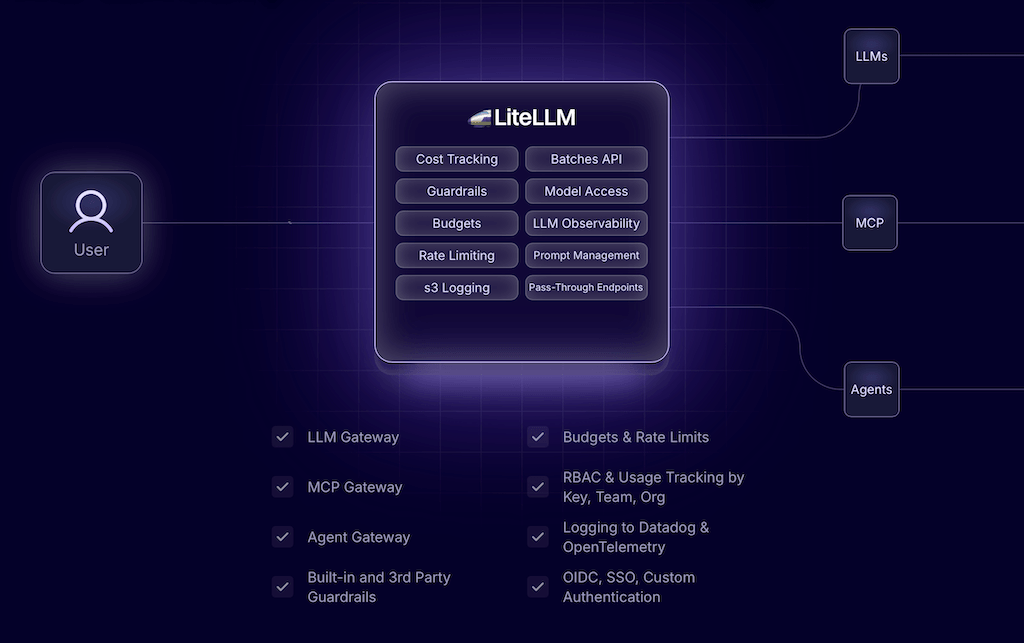
LiteLLM is the open-source AI gateway that lets you access over 100 LLMs—OpenAI, Claude, Gemini, Bedrock, and others—through a single, OpenAI-compatible API. Instead of writing separate code for each provider, you get cost tracking, load balancing, fallbacks, and guardrails all in one place.
If you’re seriously building with AI today, you rarely use just one model. GPT for one task, Claude for another, a low-cost open-source model for bulk tasks—and suddenly you’re juggling three SDKs, three authentication methods, and three monthly bills. LiteLLM is an AI gateway, meaning it manages access between applications and various LLMs. The tool has quickly become the de facto standard: over 240 million Docker pulls, more than a billion requests served, and over 1,000 contributors on GitHub. Even Netflix uses LiteLLM to give developers access to new models from day one.
In this deep dive, we’ll take a look at exactly what LiteLLM does, how the SDK and proxy work together, what it costs, and who stands to benefit from using it. Let’s get started.
What Is an AI Gateway? Explained Simply
Before we dive deeper: What exactly is an AI gateway (also known as an LLM gateway)?
Imagine a large company with a single reception desk. Whether a visitor wants to go to accounting, IT, or the CEO’s office—they check in at one spot up front, and the receptionist handles the rest. That’s exactly what an AI gateway does for AI models. Instead of your app communicating directly with OpenAI, Anthropic, Google, and every other provider individually—each with its own “language,” its own credentials, and its own billing—you send all requests to a central hub: the gateway. It translates your request into the respective provider’s format, handles the login credentials, keeps track of the costs, and automatically reroutes requests if problems arise. From the outside, you see only a single, unified interface—all the complexity behind the scenes stays neatly tucked away.
In short: An AI gateway is a central layer between your application and the ever-growing number of AI models. LiteLLM is one of the most popular AI gateways because it offers a powerful set of features and is available as open source.
LiteLLM at a glance (Source: litellm.ai)
LiteLLM at a Glance: Key Resources
Official Website – Overview, Features, and Enterprise Information
Documentation – Quickstart, SDK, proxy setup, and provider list
The Problem: Why a Model Alone Is No Longer Enough
A few years ago, things were simple: You integrated the OpenAI API, and that was it. Today, the reality is different. Anthropic, Google, Mistral, Meta, AWS Bedrock, Azure—each provider has its own strengths, its own pricing, and, unfortunately, its own API with its own format, its own authentication mechanism, and its own error messages.
For you as a developer or platform team, this means:
Every new provider = new integration effort. Learning new SDKs, transforming inputs and outputs, and adapting error handling.
No centralized overview of costs. Who on the team is using how much with which provider? Without uniform tracking, it’s all guesswork.
No failover protection. If OpenAI goes down, your app grinds to a halt—unless you’ve manually built a fallback.
Vendor lock-in. Switching or mixing models becomes a migration exercise rather than a simple configuration change.
This is exactly where LiteLLM comes in—as a translation and control layer between your app and the diverse world of LLM providers.
LiteLLM Explained in Detail
LiteLLM is available in two versions, which you can use individually or in combination depending on your needs: the Python SDK for direct integration into code and the proxy server (LLM gateway) for entire teams and organizations. The common thread between the two: everything uses the OpenAI format.
The Python SDK: One Function for All Models
At its core is the ` completion()` function. Whether you’re calling GPT, Claude, or a local model via Ollama—the call always looks the same; only the `model` string changes:
from litellm import completion
import os

os.environ["OPENAI_API_KEY"] = "your-key"

response = completion(
    model="openai/gpt-4o",
    messages=[{"role": "user", "content": "Hello, how are you?"}]
)
print(response.choices[0].message.content)
Would you rather talk to Claude instead? Just swap out "openai/gpt-4o" for "anthropic/claude-3-5-sonnet" —the rest of the code stays the same. The response will always come back in the same OpenAI format, no matter which provider is behind it. Even the error messages are mapped to OpenAI exception types, so your existing error handling will continue to work without any adjustments.
The Proxy Server: The AI Gateway for Teams
While the SDK is designed for individual applications, the proxy is aimed at platform teams that want to provide controlled LLM access to many developers. The proxy is a self-hosted, OpenAI-compatible gateway—any client that works with OpenAI also works with the proxy, without any code changes.
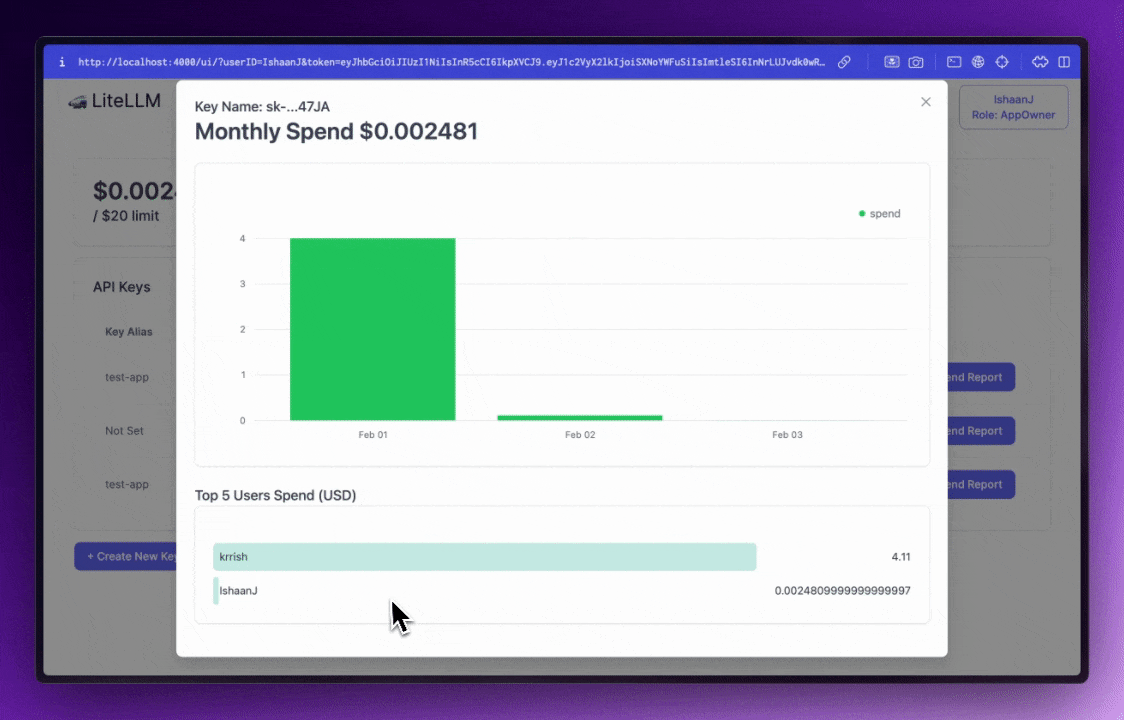
The LiteLLM proxy’s admin UI: monthly spend, API keys, and per-user spending at a glance. (Source: docs.litellm.ai)
You can start it via CLI or Docker and control everything through a configuration file that you version control in your own repository:
Then you access the gateway using the standard OpenAI client—the only difference is that the `base_url` now points to your proxy. There’s also an admin UI where you can manage virtual keys, budgets, and limits.
Cost Tracking: Finally Knowing What AI Costs
One of the biggest pain points in everyday AI use is cost. LiteLLM automatically tracks spending across OpenAI, Azure, Bedrock, GCP, and others, and breaks it down by key, user, team, or organization. You can set budgets and rate limits and even break down costs on a granular, daily basis. If you want a deeper understanding of how prices per million tokens differ among providers, our article “AI Tokenomics Explained” provides the perfect foundation.
Fallbacks & Load Balancing: No More Total Outages
If a provider goes down or hits a rate limit, LiteLLM automatically forwards the request to another deployment or provider. Retries, cooldowns, and load balancing across multiple deployments under the same model name are built in. For production systems, this is worth its weight in gold: Your users simply won’t notice the OpenAI outage.
Guardrails, Observability, and MCP Gateway
You can use guardrails to add content filtering, PII masking, and safety checks. For observability, you can integrate Langfuse, MLflow, Helicone, OpenTelemetry, and more with a single line of code. And because AI has long since expanded beyond just chat completions, LiteLLM now also serves as a gateway for agents and MCP: a single endpoint for 100 models, A2A agents, and MCP tools—you don’t need a separate agent or MCP gateway. If you’re experimenting with agents yourself, check out our guide “Build Your Own AI Agents.”
Why This Is Important for Developers and Business Teams
LiteLLM isn’t just a “nice-to-have”—it solves very specific problems depending on your role:
For developers: You write your code once and switch models via a string—no need to retrain for each provider, no duplicate error handling.
For platform teams: You grant the entire organization controlled access via a gateway—with budgets, virtual keys, and centralized logging.
For Business & Finance: Finally, transparency into which team is using how much from which provider—the foundation for effective cost control.
Especially in the DACH region, there’s another key benefit: Because you can host LiteLLM yourself, you retain full control over your data. This plays a major role in GDPR compliance, similar to the GDPR-compliant hosting of OpenAI models in Azure.
Practical Guide: How to Get Started with LiteLLM
Getting started is refreshingly straightforward. For the SDK, a single command is all it takes:
uv add litellm
# or the classic way:
pip install litellm
After that, you can make your first call right away (see code above). If you want to use the full gateway right away—with an admin UI, virtual keys, and budgets—start the proxy via Docker:
The proxy will then run at http://0.0.0.0:4000 and support the OpenAI format. For production-level, self-hosted operation, you’ll of course need a server—an affordable VPS from Hostinger is more than enough for initial testing. Tip: If you want to integrate LiteLLM into automations, it can be easily connected as an OpenAI-compatible endpoint in workflow tools like n8n.
How much does LiteLLM cost? Pricing at a glance
First, the good news: The core of LiteLLM is open source and free. There are two tiers:
Open Source (0 euros): The complete self-hosted gateway with 100 provider integrations, virtual keys, budgets, teams, load balancing, RPM/TPM limits, guardrails, and logging integrations (Langfuse, Arize, Langsmith, OTEL). You only pay for the infrastructure it runs on.
Enterprise (upon request): For large organizations with many developers. Includes everything from the OSS version plus enterprise support with SLAs, JWT authentication, SSO, audit logs, and the option for air-gapped operation. According to reports, the starting price is around $250 per month, with premium packages costing significantly more. SSO is free for up to 5 users.
Important to note: Even with the free version, there are indirect costs for hosting, maintenance, and monitoring. For true production use, you should therefore expect to have a certain infrastructure budget—but the software itself remains free.
LiteLLM vs. Other AI Gateways: The Key Advantages
There are alternatives like OpenRouter or commercial gateways. Here’s why LiteLLM is the top choice for many:
100 providers, one format: From OpenAI to Claude, Gemini, and Bedrock, all the way to local models—all using the OpenAI API syntax.
Open source & self-hosted: Full control over data and infrastructure, no forced vendor lock-in, GDPR-compliant.
Built-in cost tracking: Costs per key, team, and user—no additional tools required.
Rate limiting: To control maximum AI costs, e.g., “Users should only make about 50 LLM calls per day.”
Reliability out of the box: Fallbacks, retries, and load balancing are standard—no makeshift solutions.
Agent & MCP gateway included: A single endpoint for models, agents, and MCP tools—no separate stack required.
Huge community: Over 1,000 contributors, active development, and an ecosystem that’s constantly growing.
Which model you ultimately choose to use via LiteLLM is a matter of personal preference—our comparison of ChatGPT and Claude will help you decide.
Video: LiteLLM in Action
The official demo video shows in just a few minutes how LiteLLM handles model access, spend tracking, and fallbacks:
Official LiteLLM Demo: An Overview of Model Access, Spend Tracking, and Fallbacks.
FAQ: LiteLLM
What exactly is LiteLLM?
LiteLLM is an open-source AI gateway that provides access to over 100 LLM providers (OpenAI, Anthropic, Google, Bedrock, Azure, and many more) via a single, OpenAI-compatible API. It is available as a Python SDK and as a self-hosted proxy server with cost tracking, fallbacks, and guardrails.
How much does LiteLLM cost?
The open-source version is completely free (0 euros) and self-hosted—you only pay for your infrastructure. For large organizations, there’s an Enterprise plan with support, SSO, and audit logs, starting at around $250 per month. SSO is free for up to 5 users.
How do I install LiteLLM?
You can install the SDK using ` pip install litellm ` or `uv add litellm`. The easiest way to start the full proxy is via Docker using the official image ` docker.litellm.ai/berriai/litellm:latest ` and a configuration file. Details are available in the Docker Quickstart.
What’s the difference between LiteLLM and OpenRouter?
OpenRouter is a hosted service where you send requests through the cloud infrastructure used by OpenRouter. With LiteLLM, you host the service yourself, giving you full control over data, keys, and costs—a clear advantage when it comes to GDPR and compliance requirements. Additionally, LiteLLM is open source and can be freely extended.
Can LiteLLM be used in a GDPR-compliant manner?
Yes. Because you can host LiteLLM yourself —on your own infrastructure, on-premises, or even in an air-gapped environment—you retain data sovereignty. When combined with European hosting or an Azure deployment, LiteLLM can be operated in a privacy-friendly manner.
Learn more: LiteLLM
To help you dive deeper, we’ve compiled the best videos and resources for you:
LiteLLM solves a problem that grows with every new AI model: the fragmentation of providers. Instead of maintaining separate code, authentication, and monitoring for OpenAI, Claude, Gemini, and others, you get a single, OpenAI-compatible interface —complete with cost tracking, rate limiting, fallbacks, guardrails, and an agent and MCP gateway on top of that.
The best part: The core is open source and free, self-hostable, and therefore GDPR-compliant. Whether you’re a solo developer using just the SDK or a platform team rolling out the entire gateway—LiteLLM scales with your needs. No wonder even Netflix relies on it.
If you’re currently juggling multiple models or plan to soon: Install LiteLLM, make your first call, and feel the difference. Good luck with your development!
Ralf Schukay is a co-founder of AI Rockstars and specializes in AI automation and enterprise solutions. He tests and compares AI tools for professional use and helps teams become more productive through workflow automation.
To provide the best experiences, we use technologies like cookies to store and/or access device information. Consenting to these technologies will allow us to process data such as browsing behavior or unique IDs on this site. Not consenting or withdrawing consent, may adversely affect certain features and functions.
Functional
Always active
The technical storage or access is strictly necessary for the legitimate purpose of enabling the use of a specific service explicitly requested by the subscriber or user, or for the sole purpose of carrying out the transmission of a communication over an electronic communications network.
Preferences
The technical storage or access is necessary for the legitimate purpose of storing preferences that are not requested by the subscriber or user.
Statistics
The technical storage or access that is used exclusively for statistical purposes.The technical storage or access that is used exclusively for anonymous statistical purposes. Without a subpoena, voluntary compliance on the part of your Internet Service Provider, or additional records from a third party, information stored or retrieved for this purpose alone cannot usually be used to identify you.
Marketing
The technical storage or access is required to create user profiles to send advertising, or to track the user on a website or across several websites for similar marketing purposes.