Prompt engineering is the skill of writing structured instructions that get AI models to deliver accurate, useful results. In 2026, the discipline has evolved from simple “tricks” to a core professional skill used across industries.
Core principle: Structure beats length. A clear 3-line prompt outperforms a vague 30-line one
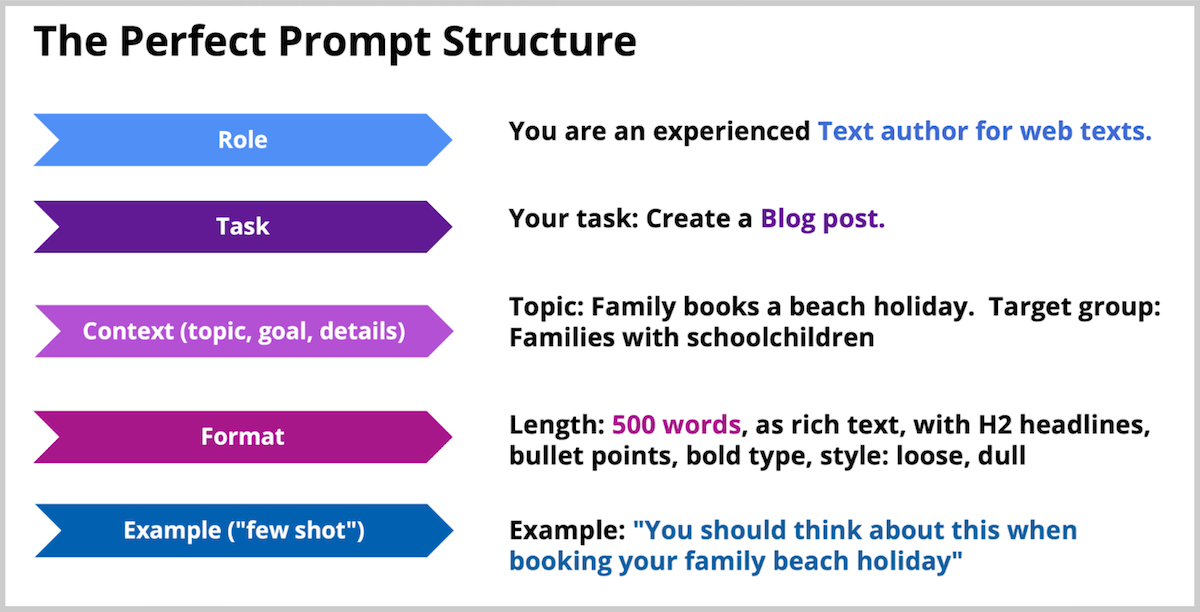
5-step framework: Role, Task, Context, Format, Example — works across all major models
Key shift in 2026: The focus has moved from “prompt engineering” to “context engineering” as models got better at reading intent
Model differences matter: Claude responds best to XML tags, GPT-5 to conversational style, Gemini to direct, short instructions
Bottom Line: You don’t need to be a developer. Anyone who works with AI benefits from learning these techniques. The difference between a mediocre and a great prompt is usually 30 seconds of additional thought.
What is Prompt Engineering?
Prompt engineering is the practice of designing structured inputs that guide AI language models to produce specific, high-quality outputs. It combines clear language, logical structure, and an understanding of how AI models process instructions to get better results from tools like ChatGPT, Claude, and Gemini.
Unlike traditional programming, prompt engineering doesn’t require coding skills. It relies on natural language, making it accessible to anyone who can write clearly. However, as AI systems grow more capable, the discipline has evolved from simple text prompts into what experts now call “context engineering” — shaping not just the instruction, but the entire environment in which the model operates: system prompts, conversation history, available tools, and output constraints.
Prompt engineering definition: Prompt engineering is the process of writing, refining, and optimizing inputs to guide generative AI systems toward producing specific, high-quality outputs. According to IBM’s 2026 Guide to Prompt Engineering, it has become a critical business capability across industries, with prompt engineers earning a median salary of $127,000 per year (Glassdoor, 2025).
Why Prompt Engineering Still Matters in 2026
Some predicted that prompt engineering would become irrelevant as AI models improve. The opposite happened. While models now handle simple requests better out of the box, complex tasks still require structured prompts.
“The gap between casual AI users and skilled prompt engineers has actually widened in 2026. Models like Claude Sonnet 4.6 and GPT-5 are incredibly capable, but that capability only surfaces when you know how to frame the task correctly.”
Evidence supporting this includes:
The prompt engineering market is projected to reach $2.06 billion by 2030, up from $222 million in 2023 (Market Research Future)
78% of enterprises now include prompt engineering in their AI training programs (Gartner, 2025)
Job postings mentioning “prompt engineering” grew 312% between 2023 and 2025 (LinkedIn Economic Graph)
The bottom line: better models don’t eliminate the need for good prompts. They raise the ceiling for what skilled practitioners can achieve.
The 6 Core Prompt Engineering Techniques
1. Zero-Shot Prompting
The simplest technique. You give the model a direct instruction without examples.
When to use: Simple, well-defined tasks where the model already “knows” the format.
Summarize the following article in 3 bullet points: [article text]
Best for: Summaries, translations, simple Q&A, classification tasks.
2. Few-Shot Prompting
You provide 1–3 examples of the desired output before your actual request. This is one of the highest-ROI techniques available.
When to use: When output format matters, or when the task is ambiguous.
Convert these product features into customer benefits.

Feature: 256GB storage
Benefit: Store over 50,000 photos without worrying about running out of space.

Feature: 5G connectivity
Benefit: Download a full movie in under 30 seconds, even on the go.

Feature: 18-hour battery life
Benefit: [Model completes this]
Best for: Content formatting, data transformation, tone-specific writing.
3. Chain of Thought (CoT) Prompting
You instruct the model to break down its reasoning into steps before delivering the final answer. Research from Google and Princeton shows CoT can improve accuracy on reasoning tasks by up to 40%.
When to use: Math problems, logic puzzles, multi-step analysis, anything requiring reasoning.
A company has 1,200 employees. 35% work remotely, and 20% of remote
workers use company-provided laptops. How many company laptops are
used by remote workers?

Think through this step by step before giving the final answer.
Best for: Calculations, strategic analysis, debugging, complex decisions.
4. Role-Based Prompting
You assign the AI a specific role, persona, or expertise level. This shapes the vocabulary, depth, and perspective of the response.
You are a senior data scientist with 15 years of experience in
machine learning. Explain gradient descent to a product manager
who has no technical background.
Best for: Tailoring complexity level, getting domain-specific responses, creative writing.
5. Constraint-Based Prompting
You define what the output must and must not include: length, format, tone, prohibited content.
Write a product description for wireless headphones.
Constraints:
- Maximum 80 words
- No superlatives (no "best", "amazing", "incredible")
- Include one specific technical spec
- End with a call to action
Best for: Marketing copy, formal documents, output that must meet specific requirements.
6. Template Prompting
You create reusable prompt structures that you fill in for different tasks. This is the bridge between prompt engineering and automation.
Example: “You are an experienced UX designer who specializes in SaaS onboarding flows.”
Why it works: Role assignment activates domain-specific knowledge and adjusts the response style to match what an expert in that field would produce.
Step 2: Specify the Task
State exactly what you want. The more specific, the better.
Weak: “Help me with my landing page.” Strong: “Review the headline and subheadline of my SaaS landing page. Identify 3 specific problems and suggest improved versions for each.”
Step 3: Provide Context and Details
Give the AI the background it needs. Include: your audience, your goal, relevant constraints, and any information the model can’t know on its own.
Example: “Our target audience is small business owners (10–50 employees) who are evaluating project management tools for the first time. They’re skeptical of AI features.”
Step 4: Specify the Format
Tell the AI how to structure the output. Don’t leave this to chance.
Example: “Present your analysis as a table with columns: Issue | Why It’s a Problem | Improved Version.”
Step 5: Provide an Example (Few-Shot)
Show the AI one example of what good output looks like. This single step often makes the biggest difference.
Example: “Here’s an example of the analysis format I want: Issue: Headline is too vague | Why: Doesn’t communicate the specific value proposition | Improved: ‘Manage Projects 3x Faster with AI-Powered Task Automation’”
Perfect prompt structure: The 5-step prompt structure consists of: (1) Define the Role, (2) Specify the Task, (3) Provide Context and Details, (4) Specify the Format, and (5) Provide an Example. This framework works universally across ChatGPT, Claude, Gemini, and other major AI models. The most impactful single step is providing an example, which typically improves output quality by 30–50%.
Different AI models respond differently to the same prompt. Here’s what works best for each in 2026:
Aspect
ChatGPT / GPT-5
Claude (Sonnet/Opus)
Gemini
Best structure
Conversational, natural language
XML tags (<instructions>, <context>)
Short, direct prompts
Context window
128K tokens
1M tokens (Sonnet 4.6)
2M tokens
Sweet spot
General knowledge, creative tasks
Coding, analysis, long documents
Multimodal, research, reasoning
Avoid
Overly structured prompts
Aggressive language (“YOU MUST”, “NEVER”)
Long, complex prompts
Few-shot
Try zero-shot first
Always helpful
Strongly recommended
System prompt
Very effective
Very effective (XML-structured)
Less impact than Claude/GPT
“Understanding model-specific behavior is what separates casual users from professionals. A prompt that performs brilliantly in Claude might produce mediocre results in Gemini, simply because the models parse structure differently.”
Common Prompt Engineering Mistakes
Avoid these pitfalls that even experienced users fall into:
Being too vague: “Write something good” gives the model nothing to work with. Always specify what, for whom, and in what format
Over-engineering: Don’t add complexity until you need it. Start simple, iterate based on output
Ignoring the system prompt: The system prompt is your most powerful tool for controlling model behavior. Use it
Putting key instructions at the end: Models pay most attention to the beginning. Lead with your most important constraints
Assuming consistency: The same prompt can produce different results. Test multiple times before relying on a prompt for production use
Using aggressive language: “CRITICAL!”, “YOU MUST”, “NEVER EVER” overtrigger newer models (especially Claude) and produce worse results than calm, direct instructions
Prompt Engineering for Different Use Cases
For Coding
Review this Python function for bugs, performance issues, and
readability. For each issue found, explain the problem, show the
current code, and provide the corrected version.

[paste function]
For Writing & Content
You are a B2B SaaS copywriter. Write a product description for
[product] that:
- Speaks to [target audience]
- Highlights these 3 benefits: [list]
- Uses the PAS framework (Problem, Agitation, Solution)
- Is between 150-200 words
- Ends with a clear CTA
For Data Analysis
Analyze this dataset and provide:
1. Top 3 patterns or trends
2. One unexpected finding
3. 3 actionable recommendations based on the data

Present findings as an executive summary (max 300 words) followed
by a detailed table.

[paste data]
For Research
Compare [Topic A] and [Topic B] across these dimensions:
- Cost
- Ease of implementation
- Scalability
- Industry adoption

Format: Comparison table followed by a 2-paragraph recommendation
for a mid-size SaaS company.
Next Steps: Where to Learn More
Ready to go deeper? These resources offer advanced techniques and hands-on practice:
The most effective way to improve is practice. Pick one technique from this guide, apply it to your next AI interaction, and compare the results to your usual approach.
Advanced Prompt Engineering for Professionals
While the fundamentals above work for most use cases, professionals working with AI daily need to go deeper. Here are three advanced patterns that separate casual users from power users in 2026.
Meta-Prompting: Prompts That Write Prompts
Instead of writing the perfect prompt yourself, ask the AI to generate one. This works especially well for complex tasks where you know the goal but not the optimal instruction structure. Example: “You are a prompt engineering expert. Write me the optimal prompt to get Claude to analyze a legal contract and flag all clauses that create liability for the client. Include role, context, constraints, and output format.”
Multi-Turn Prompt Chains
Break complex tasks into sequential prompts where each step builds on the previous output. This is more reliable than a single monolithic prompt because each step can be validated independently. A typical chain for content creation: (1) Research and outline → (2) Draft each section → (3) Edit for tone and accuracy → (4) Format and polish.
Evaluation-Driven Prompting
For production systems, don’t just write prompts — test them systematically. Create a set of 10-20 test inputs with expected outputs, run your prompt against all of them, and measure accuracy. This is how teams at companies like Anthropic, OpenAI, and Google optimize their system prompts. Tools like n8n or LangSmith make this process repeatable.
“The biggest misconception about prompt engineering is that it’s about finding magic words. In reality, it’s about clear communication. The same skills that make you good at writing briefs for human colleagues make you good at prompting AI — specificity, structure, and concrete examples.”
Prompt Engineering Tools and Resources
The best way to improve is practice, but these resources accelerate learning:
Anthropic’s Prompt Engineering Guide — the most comprehensive official resource, covering system prompts, Claude-specific patterns, and production best practices
OpenAI Cookbook — practical examples and code snippets for GPT models
Prompt Engineering Daily — newsletter tracking new techniques and research
AI Rockstars’ Prompting Techniques Guide — our companion article covering 10 proven methods with examples
Frequently Asked Questions
What is prompt engineering?
Prompt engineering is the practice of writing structured instructions that guide AI models like ChatGPT, Claude, and Gemini to produce specific, high-quality outputs. It combines clear language, logical structure, and an understanding of model behavior to get better results. No coding skills are required.
Is prompt engineering still relevant in 2026?
Yes. While AI models have improved at handling simple requests, complex professional tasks still require structured prompts. The prompt engineering market is projected to reach $2.06 billion by 2030, and 78% of enterprises now include it in their AI training programs.
What is the difference between zero-shot and few-shot prompting?
Zero-shot prompting gives the model a direct instruction without examples. Few-shot prompting includes 1–3 examples of desired input-output pairs before the actual request. Few-shot is more reliable when output format matters, while zero-shot works well for simple, well-defined tasks.
What is Chain of Thought prompting?
Chain of Thought (CoT) prompting instructs the AI to break down complex problems into step-by-step reasoning before giving a final answer. Research from Google and Princeton shows this technique can improve accuracy on reasoning tasks by up to 40%. It’s most useful for math, logic, analysis, and multi-step decisions.
Do I need coding skills for prompt engineering?
No. Prompt engineering relies on natural language, not code. Anyone who can write clearly can learn it. However, combining prompt engineering with basic scripting (Python, JavaScript) enables automation and is increasingly valuable for professional roles. Prompt engineers earn a median salary of $127,000 per year according to Glassdoor.
How do I write a good prompt for ChatGPT?
Follow the 5-step structure: (1) Define a role for the AI, (2) Specify the task clearly, (3) Provide context and background, (4) Specify the output format, and (5) Include an example of desired output. Start with a simple version, review the output, and iterate. ChatGPT responds best to conversational, natural language prompts.
What is the difference between prompt engineering and context engineering?
Prompt engineering focuses on crafting the individual instruction sent to an AI model. Context engineering is the broader discipline of shaping the entire environment: system prompts, conversation history, available tools, and output constraints. In 2026, “context engineering” has emerged as the more accurate term for production AI systems.
To provide the best experiences, we use technologies like cookies to store and/or access device information. Consenting to these technologies will allow us to process data such as browsing behavior or unique IDs on this site. Not consenting or withdrawing consent, may adversely affect certain features and functions.
Functional
Always active
The technical storage or access is strictly necessary for the legitimate purpose of enabling the use of a specific service explicitly requested by the subscriber or user, or for the sole purpose of carrying out the transmission of a communication over an electronic communications network.
Preferences
The technical storage or access is necessary for the legitimate purpose of storing preferences that are not requested by the subscriber or user.
Statistics
The technical storage or access that is used exclusively for statistical purposes.The technical storage or access that is used exclusively for anonymous statistical purposes. Without a subpoena, voluntary compliance on the part of your Internet Service Provider, or additional records from a third party, information stored or retrieved for this purpose alone cannot usually be used to identify you.
Marketing
The technical storage or access is required to create user profiles to send advertising, or to track the user on a website or across several websites for similar marketing purposes.