Microsoft brings AI agents to Power Apps: New MCP integration unveiled
Microsoft is expanding its Power Apps with AI capabilities: The new Model Context Protocol (MCP) integration enables developers to embed intelligent agents directly into business applications. This should enable companies…
RSRalf SchukayUpdated Jun 8, 20265 min read Human reviewed
✓ ReviewedLast updated June 8, 2026 by Ralf Schukay
Microsoft is expanding its Power Apps with AI capabilities: The new Model Context Protocol (MCP) integration enables developers to embed intelligent agents directly into business applications. This should enable companies to make their workflows significantly more efficient.
MCP support in Power Apps matters because business apps can expose actions and data to AI agents in a more structured way. The opportunity is faster workflow automation; the risk is uncontrolled access. Treat MCP integrations as governed interfaces, not as casual chatbot features.
Our verdict: MCP makes Power Apps more agent-ready
The strategic value of MCP in Power Apps is standardization. Instead of building one-off connectors for every AI assistant, teams can expose business capabilities through a protocol that agents can understand more consistently.
Scenario
Power Apps MCP value
Risk to manage
Internal approval workflows
Agents can retrieve status, prepare actions, and reduce manual lookups.
Human approval must remain explicit for sensitive decisions.
CRM and service operations
Agents can connect app data with support or sales workflows.
Permissions and audit logs must be clear.
Low-code automation
Business teams can create agent-ready apps without full custom development.
Poorly designed data models will create unreliable automations.
Microsoft 365 environments
Fits naturally with Copilot, Power Platform, and enterprise identity.
Governance should be defined before broad rollout.
Editorial recommendation: start with read-only or low-risk actions, measure failure modes, and only then allow agents to trigger business-critical steps.
Power Apps becomes a platform for AI agents
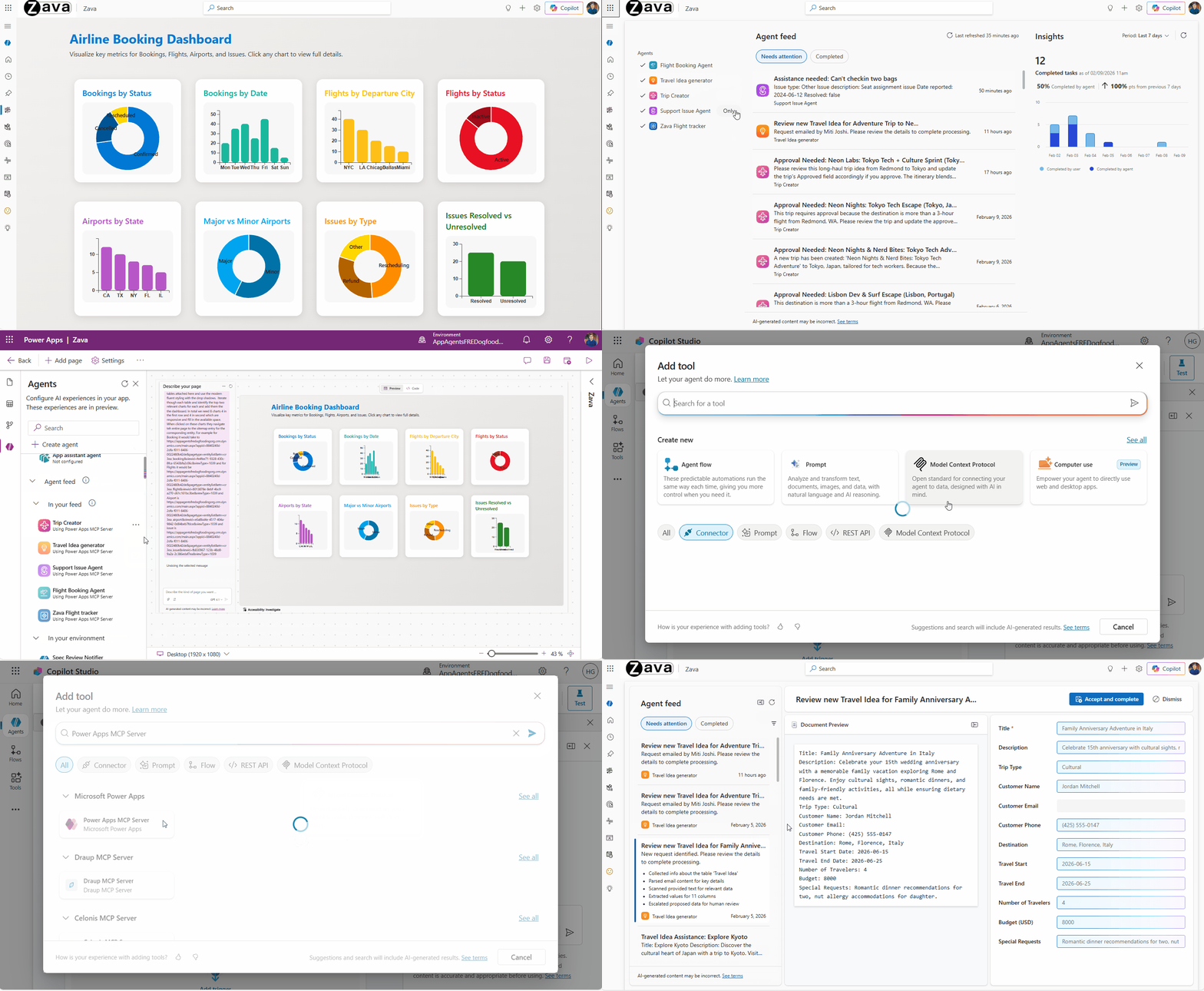
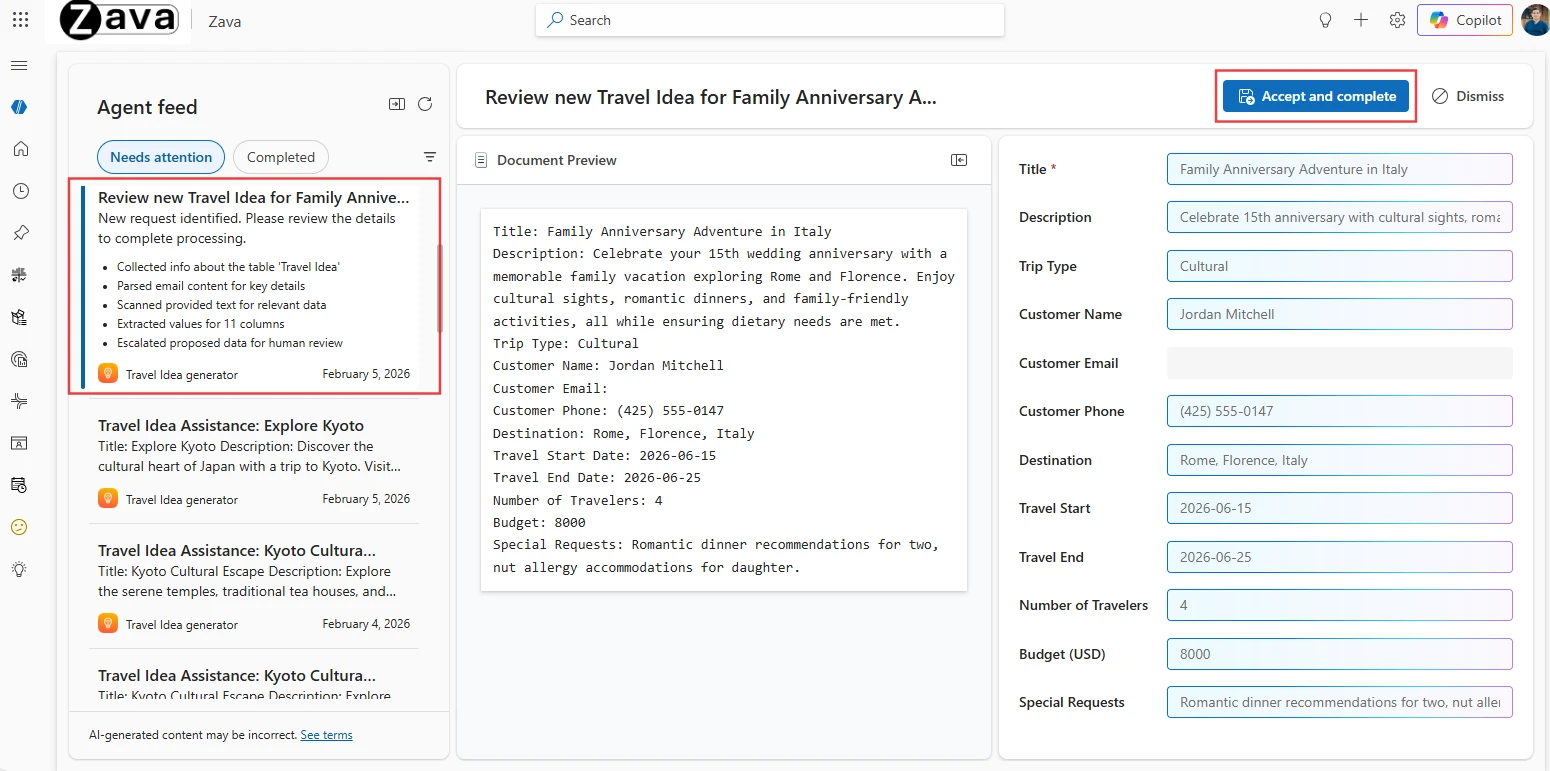
Microsoft has announced two important new features for Power Apps, which are currently available in public preview: the integration of the Model Context Protocol (MCP) and an improved Agent Feed. Both features are designed to seamlessly integrate AI-powered assistants into business applications.
The Model Context Protocol (MCP) is an open standard that enables AI models to communicate with various data sources and tools. For Power Apps, this means that developers can now integrate MCP servers that enable access to company data, APIs, and external systems. AI agents can use this to retrieve and process information from different sources – without having to write separate code for each interface.
Setup is done via the Power Apps Maker area, where developers can configure MCP servers and connect them to their agents. Microsoft promises easy integration that should also be manageable for low-code developers.
Improved agent feed for a better overview
In addition to MCP integration in Power Apps, Microsoft has revamped the Agent Feed. This feature shows users a personalized overview of all AI agents available in their Power Apps. The feed is designed to help users quickly find the right assistant for a specific task, such as data analysis, automation, or customer inquiries.
Why is this relevant?
With this expansion, Microsoft is clearly positioning itself in the competition for AI-powered business tools. While other providers are also relying on AI agents, Microsoft is trying to gain an advantage by integrating them into the already widely used Power Platform. Companies that already use Power Apps can thus easily incorporate AI functions into their existing workflows.
The openness of the MCP standard is an important point here: instead of relying on proprietary solutions, Microsoft enables the connection of various data sources and services.
The new features are still in the preview phase, but they show the direction in which Microsoft is developing its low-code platform. Anyone who wants to test the features can already try them out in Power Apps. A date for general availability has not yet been announced.
Frequently Asked Questions
What is the MCP integration in Microsoft Power Apps?
The Model Context Protocol (MCP) integration in Power Apps lets developers embed AI agents into low-code apps, giving them structured access to enterprise data, Microsoft 365 services, and custom tools — without writing API integration code.
Who is this MCP integration for?
Citizen developers and IT teams building internal apps on the Microsoft Power Platform who want to add Claude, GPT, or other MCP-compatible AI agents to existing low-code workflows.
Which AI models can I use via Power Apps MCP?
Any MCP-compliant model. As of 2026, this includes Anthropic Claude (full MCP support), OpenAI GPT (via official MCP server), and several open-source models running on Azure or local infrastructure.
Does Power Apps MCP work with Microsoft 365 Copilot?
Yes. The MCP integration is designed to coexist with Copilot, letting you build specialized agents for narrow business processes while Copilot handles general productivity tasks.
Is the Power Apps MCP integration generally available?
Microsoft rolls out MCP support progressively. Check the Power Platform release notes for your tenant region for exact GA status.
Ralf Schukay is a co-founder of AI Rockstars and specializes in AI automation and enterprise solutions. He tests and compares AI tools for professional use and helps teams become more productive through workflow automation.
To provide the best experiences, we use technologies like cookies to store and/or access device information. Consenting to these technologies will allow us to process data such as browsing behavior or unique IDs on this site. Not consenting or withdrawing consent, may adversely affect certain features and functions.
Functional
Always active
The technical storage or access is strictly necessary for the legitimate purpose of enabling the use of a specific service explicitly requested by the subscriber or user, or for the sole purpose of carrying out the transmission of a communication over an electronic communications network.
Preferences
The technical storage or access is necessary for the legitimate purpose of storing preferences that are not requested by the subscriber or user.
Statistics
The technical storage or access that is used exclusively for statistical purposes.The technical storage or access that is used exclusively for anonymous statistical purposes. Without a subpoena, voluntary compliance on the part of your Internet Service Provider, or additional records from a third party, information stored or retrieved for this purpose alone cannot usually be used to identify you.
Marketing
The technical storage or access is required to create user profiles to send advertising, or to track the user on a website or across several websites for similar marketing purposes.