Google Search Console Shows AI Traffic: New Reports for AI Overviews & AI Mode
Google is finally expanding Search Console with new reports on traffic from generative AI search results. This will help website owners better understand how their content performs in AI Overviews…
FSFlorian SchröderUpdated Jun 23, 20265 min read Human reviewed
✓ ReviewedLast updated June 23, 2026 by Florian Schröder
Google is finally expanding Search Console with new reports on traffic from generative AI search results.This will help website owners better understand how their content performs in AI Overviews and AI Mode.
Part of our Google Gemini Guide. For the full picture, see our complete Google Gemini Guide.
Google Search Console now also displays data from AI search results
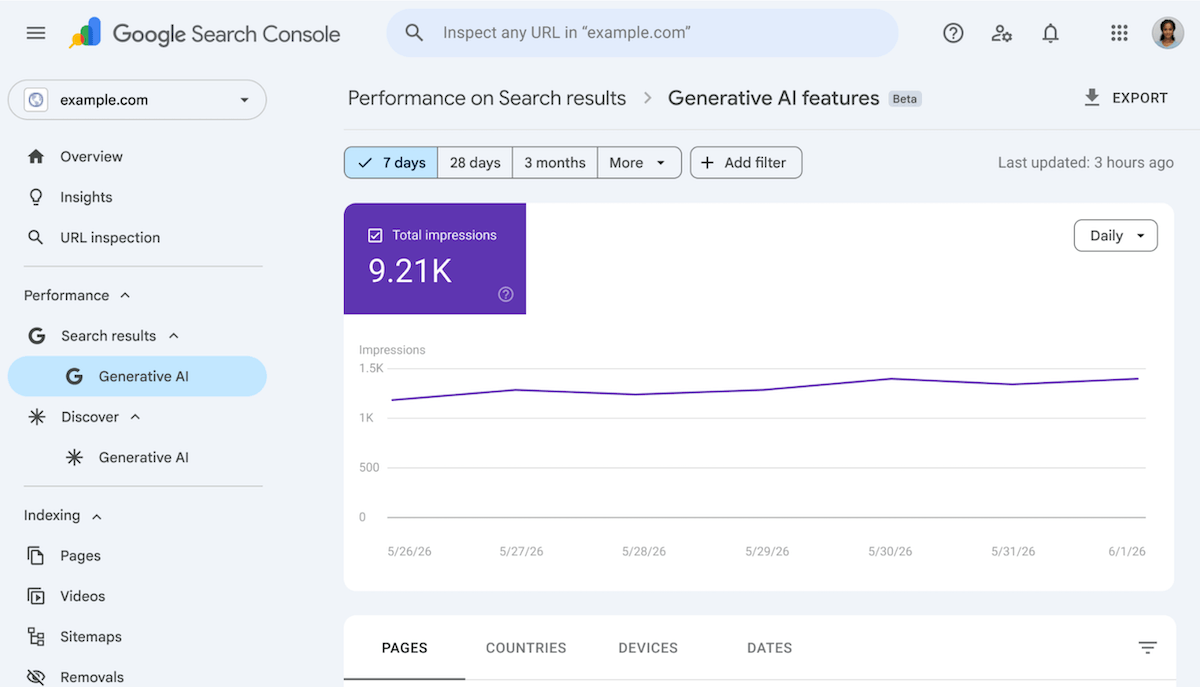
On June 3, 2026, Google finally announced new reports for Google AI Search on the official Search Central Blog. In Google Search Console, data from AI Overviews and AI Mode can now be analyzed in a more targeted manner. This makes it clearer for website owners, SEO teams, and publishers just how much reach content actually generates in Google’s AI-powered search results.
What exactly is new?
Until now, it was often unclear how appearances in generative search interfaces impacted impressions, clicks, and visibility. Google now provides dedicated analysis tools for this in Search Console.
New segmentation: Traffic from AI Overviews and AI Mode is now more clearly identifiable in the performance data.
Greater transparency: Website operators can see more clearly whether content is included in AI responses and whether this generates clicks.
Better analysis: The data helps evaluate differences between traditional web search and AI-powered results.
Why this matters
With AI Overviews, Google answers many search queries directly on the results page. AI Mode moves even further toward conversational search. For publishers and businesses, this raises a key question: Are visitors still coming to their own website, or does the answer remain entirely on Google? (so-called “zero-click” search)
This is exactly where the new reports become important. They help not only to speculate about trends but to substantiate them with data.
For publishers: You can check whether editorial content appears in AI responses and whether that translates into traffic.
For businesses: FAQ, how-to, and product pages can be analyzed more specifically for visibility in new search formats.
For SEO teams: The impact of structured content, clear answers, and helpful page formats becomes more measurable.
Practical examples of use
The new reports are important for all companies that want to be visible online and answer specific questions such as:
Visibility of how-to articles: If a how-to article generates impressions in AI Overviews but hardly any clicks, the user may have already found the complete answer in Google Search via AI-generated results (zero-click search).
Compare content: If a product page performs poorly in standard search but appears more frequently in AI Mode, it’s worth examining the structure, clarity, and direct answers within the text.
Prioritize topics: Areas with high AI visibility can be specifically expanded, for example with step-by-step guides, tables, or concise FAQ sections.
With the new Search Console reports, Google is addressing a real-world problem: AI search results are changing traffic patterns, but until now, there has often been a lack of appropriate metrics to measure this. The new data on AI Overviews and AI Mode makes it clearer which content is visible in generative search and whether it still drives visits. For anyone who publishes content for the web, these reports are likely to quickly become an essential tool.
AI Rockstars verdict
TL;DR: Google Search Console AI traffic reporting matters because AI Overviews and AI Mode can change impressions, clicks, and attribution patterns. Treat these reports as a visibility signal, not a complete AI-search measurement system.
Editorial recommendation: Use GSC AI reporting together with GA4, server logs, rank tracking, and brand mention monitoring. The strongest insight comes from comparing affected queries, pages, click-through rates, and downstream conversions instead of looking at AI traffic in isolation.
How to interpret AI traffic signals in Search Console
Factor
Priority
Why it matters
AI Overview impressions
High
Shows where Google may summarize or cite content before a click happens.
Click-through changes
Critical
AI surfaces can raise visibility while reducing or shifting clicks.
Query and page mapping
High
Teams need to know which topics are gaining or losing AI-search exposure.
Conversion comparison
Critical
Traffic quality matters more than raw AI visibility.
FAQ
Does Google Search Console show AI traffic?
Google has been adding reporting related to AI search surfaces, but teams should still combine GSC data with analytics, logs, and rank tracking.
Why can AI Overviews reduce clicks?
AI Overviews may answer part of the query directly, which can change how often users click through to source pages.
What should marketers measure first?
Start with affected queries, landing pages, impressions, clicks, CTR changes, and downstream conversions.
Florian Schröder is a co-founder of AI Rockstars and an expert in AI strategies for marketing. He advises companies on integrating AI tools such as ChatGPT, Claude, and Gemini into their workflows. With over 10 years of experience in digital marketing, he combines technical expertise with practical applications.
To provide the best experiences, we use technologies like cookies to store and/or access device information. Consenting to these technologies will allow us to process data such as browsing behavior or unique IDs on this site. Not consenting or withdrawing consent, may adversely affect certain features and functions.
Functional
Always active
The technical storage or access is strictly necessary for the legitimate purpose of enabling the use of a specific service explicitly requested by the subscriber or user, or for the sole purpose of carrying out the transmission of a communication over an electronic communications network.
Preferences
The technical storage or access is necessary for the legitimate purpose of storing preferences that are not requested by the subscriber or user.
Statistics
The technical storage or access that is used exclusively for statistical purposes.The technical storage or access that is used exclusively for anonymous statistical purposes. Without a subpoena, voluntary compliance on the part of your Internet Service Provider, or additional records from a third party, information stored or retrieved for this purpose alone cannot usually be used to identify you.
Marketing
The technical storage or access is required to create user profiles to send advertising, or to track the user on a website or across several websites for similar marketing purposes.