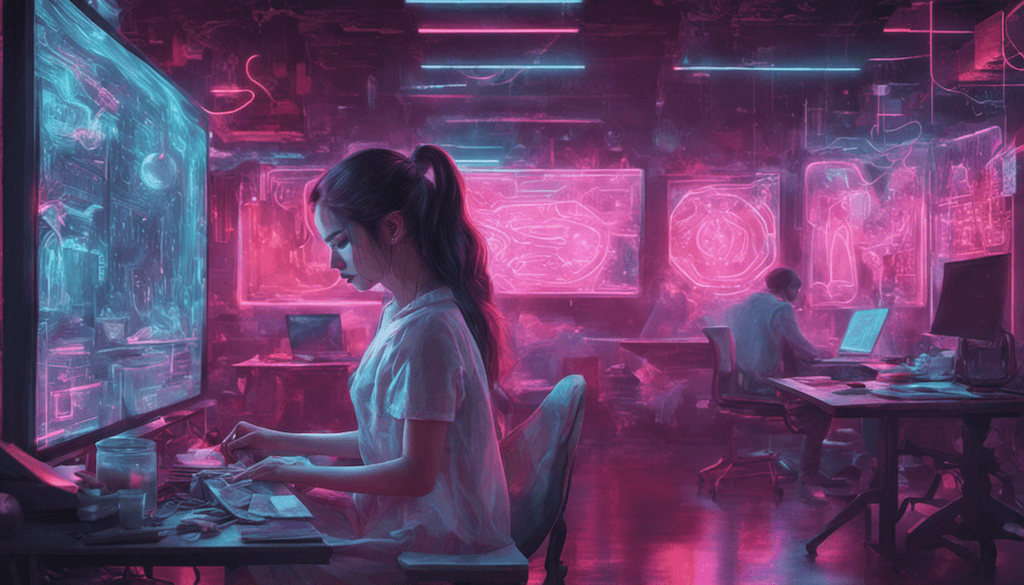
AI image generation is the process of using machine-learning models — primarily diffusion models and transformer-based architectures — to create visual content from a text description, a reference image, or a combination of both. Instead of opening Photoshop and manually composing a scene, you type a prompt like \”a futuristic city skyline at dusk, cinematic lighting, 8K, photorealistic\” and the model renders a full image within seconds.
\n\n
Under the hood, modern image generators are trained on billions of image-text pairs. During training the model learns statistical relationships between words and visual patterns. During inference — when you ask it to generate an image — it starts from random noise and iteratively refines pixel values, guided by your prompt, until a coherent image emerges. This process is called denoising diffusion, and it is the engine behind most state-of-the-art generators available today.
\n\n
The technology has matured dramatically. Where 2022-era generators struggled with human hands and coherent text, 2026 models handle anatomy, typography, product shots, and photorealistic portraits with striking fidelity. The barrier to producing professional-grade visuals has collapsed — and with it, the economics of content creation, marketing, and design.
\n\n\n
Top AI Image Generators in 2026
\n\n
The market has consolidated around a handful of dominant platforms, each with distinct strengths. Here is how the leading tools stack up as of March 2026.
\n\n
\n
\n
\n
\n
Tool
\n
Best For
\n
Pricing (2026)
\n
Output Quality
\n
Speed
\n
Commercial Use
\n
\n
\n
\n
\n
Midjourney V7
\n
Artistic & editorial imagery
\n
$10–$96/mo
\n
★★★★★
\n
Fast (Turbo mode)
\n
✅ Paid plans
\n
\n
\n
DALL-E 3
\n
ChatGPT integration, precise prompts
\n
Free (limited) / $20+/mo via ChatGPT Plus
\n
★★★★☆
\n
Medium
\n
✅ Yes
\n
\n
\n
Stable Diffusion 3.5
\n
Open-source, local deployment
\n
Free (self-hosted) / API from $0.003/img
\n
★★★★☆
\n
Variable (hardware-dependent)
\n
✅ Open license (check model card)
\n
\n
\n
Gemini Imagen 3
\n
Google Workspace integration, photorealism
\n
Included in Gemini Advanced ($19.99/mo)
\n
★★★★★
\n
Fast
\n
✅ Yes (personal & commercial)
\n
\n
\n
Flux (Black Forest Labs)
\n
High-detail, text rendering in images
\n
Free (FLUX.1 Schnell) / Pro via API
\n
★★★★★
\n
Very fast (Schnell variant)
\n
✅ Apache 2.0 (Schnell)
\n
\n
\n
Adobe Firefly
\n
Brand-safe, commercially cleared stock
\n
Free (25 credits/mo) / $9.99–$54.99/mo
\n
★★★★☆
\n
Fast
\n
✅ Fully cleared (trained on licensed content)
\n
\n
\n
\n
\n\n\n\n\n\n
Bottom line: Midjourney V7 and Gemini Imagen 3 lead on raw image quality in 2026. Flux is the speed-and-detail champion for developers. Adobe Firefly is the safest choice for corporate marketing teams that cannot afford copyright ambiguity.
\n\n\n
Text-to-Image vs. Image-to-Image: What’s the Difference?
\n\n
All major platforms support at least two core generation modes. Understanding both unlocks dramatically more creative control.
\n\n
Text-to-Image (T2I)
\n
You provide a written prompt — and only a written prompt — and the model generates an image from scratch. This is the entry point for most users and the format that made the technology famous. The quality of your output is almost entirely determined by the quality of your prompt: style references, lighting descriptions, aspect ratios, and negative prompts all shape the result.
\n\n
Best use cases: concept art, marketing hero images, blog illustrations, rapid ideation, stock photo replacement.
\n\n
Image-to-Image (I2I)
\n
You provide a reference image alongside your prompt. The model uses that image as a structural or stylistic anchor and transforms or extends it according to your instructions. A typical workflow: upload a rough sketch, prompt the model to render it as a photorealistic product photo. Or provide a brand photo and ask the model to relight it, change the background, or place it in a new environment.
\n\n
Best use cases: product variation shots, style transfer, background replacement, image upscaling, inpainting (editing specific regions), outpainting (extending beyond original borders).
\n\n
\n Pro Tip: Most professional workflows combine both modes. Start with text-to-image to generate a strong composition, then use image-to-image to refine specific elements — face consistency, product placement, or brand color alignment.\n
\n\n\n
How to Create AI Images: A 6-Step Guide
\n\n\n\n
Whether you are a total beginner or a designer exploring AI workflows, this framework works across every major platform.
\n\n
\n
\n Choose the right tool for your use case. \n Match the platform to your goal: Midjourney for artistic quality, Adobe Firefly for commercial safety, Stable Diffusion for full local control, Flux for speed and text-heavy images. If you are unsure, start with the free tier of DALL-E 3 via ChatGPT or Adobe Firefly — no credit card required.\n
\n
\n Define your subject, style, and mood before you type anything. \n Vague prompts produce vague images. Before opening the tool, answer three questions: (1) What is the main subject? (2) What visual style do you want (photorealistic, illustration, 3D render, oil painting)? (3) What is the emotional tone or atmosphere? Write those answers down — they become the skeleton of your prompt.\n
\n
\n Write a structured prompt. \n A reliable formula: [Subject] + [Action/Pose] + [Environment] + [Lighting] + [Style] + [Technical specs]. Example: \”A female architect reviewing blueprints at a sunlit drafting table, shallow depth of field, natural side lighting, realistic editorial photography style, Sony A7R V, 85mm lens\”. The more specific, the better.\n
\n
\n Use negative prompts to exclude unwanted elements. \n Most platforms (Stable Diffusion, Midjourney via --no flag, DALL-E via instruction) let you specify what you do not want: \”no text, no watermark, no blurry background, no extra fingers\”. Negative prompts prevent the most common failure modes.\n
\n
\n Iterate — do not settle for the first result. \n Generate four to eight variations of your initial prompt. Identify the strongest candidate, then refine: adjust the lighting description, change the aspect ratio, increase style intensity, or use image-to-image to build on what is working. Most professionals run three to five iteration rounds before finalizing.\n
\n
\n Post-process and verify before publishing. \n Run your final image through an upscaler if needed (Topaz Gigapixel, Magnific AI). Check hands, faces, and text elements carefully — these remain the most common artifact zones in 2026. Verify your licensing rights, add metadata, and resize for your target platform before uploading.\n
\n
\n\n\n
Best Practices for AI Image Prompting
\n\n
Prompt engineering for images is a learnable skill, not an art. The following principles are derived from thousands of professional generation workflows and apply across platforms.
\n\n
Be Specific About Style References
\n
Instead of \”a nice landscape painting,\” write \”a landscape in the style of Northern European Romanticism, muted greens and grays, dramatic overcast sky, reminiscent of Caspar David Friedrich.\” Named styles, art movements, and even camera models give the model strong, unambiguous anchors.
\n\n
Control Lighting Explicitly
\n
Lighting makes or breaks a generated image. Use terms like: golden hour sunlight, hard rim lighting, diffused studio softbox, neon volumetric fog, three-point lighting setup, chiaroscuro. Lighting descriptors alone can elevate an average output to a professional one.
\n\n
Specify Aspect Ratio and Resolution Early
\n
In Midjourney, append --ar 16:9 for widescreen or --ar 9:16 for mobile. In other tools, set dimensions before generating. Changing aspect ratio after the fact often requires full regeneration. Match the ratio to your intended use case from the start.
\n\n
Use Weighted Terms Where Supported
\n
Midjourney and some Stable Diffusion frontends support prompt weighting syntax (e.g., forest::2 cabin::1). Boosting the weight of your primary subject ensures it does not get visually overwhelmed by background details.
\n\n
Build a Prompt Library
\n
Document every prompt that produces a strong result. Over time, you will accumulate reusable style strings, lighting setups, and quality modifiers that can be dropped into new prompts. This is how professional AI studios achieve brand consistency at scale.
\n\n
\n \”The teams achieving the most consistent, high-quality AI imagery are not the ones with the most powerful hardware — they are the ones with the most disciplined prompting systems. A well-maintained prompt library beats a bigger GPU budget every time.\” \n — Florian Schröder, AI Consultant and Co-founder of AI Rockstars\n
\n\n\n
AI Image Generation for Business
\n\n
The ROI case for AI image generation in commercial contexts is now well-established. Here is how leading teams are applying it across three key domains.
\n\n\n\n
Marketing and Advertising
\n
Marketing teams are using AI image generation to collapse the gap between concept and campaign-ready creative. What once required a photographer, a studio booking, a model release, and a post-production pass can now be drafted in an afternoon. Specific applications include:
\n
\n
Ad creative testing: Generate 20 visual variants of a concept and A/B test at scale before committing to a full production shoot.
\n
Localization: Swap backgrounds, demographics, and cultural references for regional markets without reshooting.
\n
Social media content: Maintain a consistent posting cadence with on-brand imagery generated on demand.
\n
Campaign concepting: Present photorealistic mood boards to clients weeks before a production timeline would allow.
\n
\n\n
E-Commerce and Product Imagery
\n
For e-commerce, product photography is a major operational cost. AI image generation addresses this at multiple stages of the product lifecycle:
\n
\n
Lifestyle mockups: Place a product into contextual scenes (a coffee mug on a sunlit kitchen counter) without a physical shoot.
\n
Background removal and replacement: Tools like Adobe Firefly’s Generative Fill replace white-background product shots with rich environments in seconds.
\n
Pre-production visualization: Show customers how a product looks in different colorways or configurations before manufacturing.
\n
Catalog scaling: A fashion retailer managing 10,000 SKUs can generate consistent flat-lay imagery at a fraction of traditional studio costs.
\n
\n\n
Content Creation and Publishing
\n
Bloggers, newsletter writers, and content teams face a constant demand for original visuals. AI image generation provides:
\n
\n
Custom blog illustrations: Replace generic stock photos with images that precisely match the article concept.
\n
Infographic components: Generate icons, diagrams, and decorative elements that match a publication’s visual identity.
\n
Book and report covers: Produce polished, professional cover designs for ebooks, white papers, and research reports.
\n
Thumbnail optimization: YouTube creators and newsletter editors use AI to test thumbnail variants that maximize click-through rates.
\n
\n\n
\n Commercial Licensing Warning: Not all AI image generators grant commercial rights by default. Midjourney requires a paid plan. DALL-E 3 and Gemini Imagen 3 grant commercial rights to paid users. Stable Diffusion’s open license applies to the model, not necessarily to outputs generated via third-party APIs. Adobe Firefly is the most legally conservative option for enterprise use. Always verify the current Terms of Service before publishing AI-generated imagery in a commercial context.\n
\n\n\n
Frequently Asked Questions About AI Image Generation
\n\n\n\n
What is the best AI image generator in 2026?
\n
There is no single best tool — the answer depends on your use case. Midjourney V7 is widely considered the gold standard for artistic and editorial quality. Gemini Imagen 3 leads in photorealism and integrates seamlessly with Google Workspace. Flux is the top choice for speed and accurate text rendering within images. Adobe Firefly is the safest option for enterprise marketing teams due to its fully commercially-cleared training data. For most individuals getting started, a free tier of DALL-E 3 (via ChatGPT) or Adobe Firefly is the lowest-friction entry point.
\n\n\n\n
Is AI image generation free?
\n
Several platforms offer genuinely usable free tiers. Adobe Firefly gives new users 25 generative credits per month at no cost. DALL-E 3 is accessible with limited generations through the free tier of ChatGPT. Stable Diffusion (and Flux Schnell) can be run completely free if you have compatible hardware — a modern consumer GPU with 8GB+ VRAM is sufficient for most models. Paid plans unlock higher resolution, faster generation speeds, priority queues, and commercial licensing. For professional use, budget $10–$30/month depending on volume.
\n\n
Can AI-generated images be used commercially?
\n
Yes — but the rules vary significantly by platform. Adobe Firefly is the most permissive: its outputs are fully cleared for commercial use, and Adobe indemnifies enterprise customers against copyright claims. Midjourney grants commercial rights to all paid subscribers (Basic plan and above). DALL-E 3 and Gemini Imagen 3 permit commercial use for subscribers, subject to their usage policies. Stable Diffusion operates under open-source licensing, but outputs may carry restrictions depending on which model weights and which hosting platform you use. Always consult the current Terms of Service — these policies update frequently as the legal landscape evolves.
\n\n
How does Midjourney compare to DALL-E 3?
\n
The two tools serve overlapping but distinct use cases. Midjourney V7 produces more visually distinctive, aesthetically cohesive imagery — it excels at editorial, artistic, and mood-driven work. Its output has a recognizable quality that has made it the default tool for designers and visual artists. DALL-E 3 integrates directly with ChatGPT, which means you can use natural-language conversation to iteratively refine prompts — a major advantage for users who are not confident writing structured prompts. DALL-E 3 also follows instructions more literally, which is useful for precise compositions. If aesthetics are the priority, choose Midjourney. If workflow integration and prompt ease matter more, DALL-E 3 is the stronger choice.
\n\n\n\n
What is Stable Diffusion?
\n
Stable Diffusion is an open-source text-to-image model developed by Stability AI. Unlike Midjourney and DALL-E, it can be downloaded and run locally on your own hardware — no monthly subscription, no usage limits, no data shared with a third-party server. This makes it uniquely attractive for developers, researchers, and privacy-conscious users. The latest release, Stable Diffusion 3.5, delivers significant improvements in prompt adherence, typography within images, and fine-grained composition control. The tradeoff: running it well requires technical setup, a compatible GPU, and ongoing model management. A large ecosystem of frontends (ComfyUI, Automatic1111, InvokeAI) and fine-tuned model variants (LoRAs, Dreambooth) makes it the most customizable platform available — but also the most demanding to master.
\n\n\n\n\n
The Future of Visual Content Is Already Here
\n\n
AI image generation has moved far beyond novelty. In March 2026, it is a core production tool for marketers, designers, publishers, and developers — one that compresses timelines, reduces costs, and enables creative experimentation at a scale that was previously impossible.
\n\n
The technology will continue to improve. Multimodal models that understand context more deeply, video generation that extends these capabilities into motion, and tighter integration with design tools and CMSs are all accelerating. What will not change is the importance of knowing which tool to use, when, and how to prompt it effectively.
\n\n
The teams and individuals who invest in building that knowledge today will hold a significant creative and operational advantage. Whether you are replacing your stock photo subscription, cutting your product photography budget, or simply making your blog look significantly better — there has never been a better moment to start.
To provide the best experiences, we use technologies like cookies to store and/or access device information. Consenting to these technologies will allow us to process data such as browsing behavior or unique IDs on this site. Not consenting or withdrawing consent, may adversely affect certain features and functions.
Functional
Always active
The technical storage or access is strictly necessary for the legitimate purpose of enabling the use of a specific service explicitly requested by the subscriber or user, or for the sole purpose of carrying out the transmission of a communication over an electronic communications network.
Preferences
The technical storage or access is necessary for the legitimate purpose of storing preferences that are not requested by the subscriber or user.
Statistics
The technical storage or access that is used exclusively for statistical purposes.The technical storage or access that is used exclusively for anonymous statistical purposes. Without a subpoena, voluntary compliance on the part of your Internet Service Provider, or additional records from a third party, information stored or retrieved for this purpose alone cannot usually be used to identify you.
Marketing
The technical storage or access is required to create user profiles to send advertising, or to track the user on a website or across several websites for similar marketing purposes.