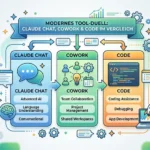
Anthropic introduces new interface mechanics that transform AI from an isolated chatbot to an integrated team member. The Research Preview introduces persistent work environments where users can iterate code and documents in real time together with the model.
Part of our AI Agents Guide. For the full picture, see our complete AI Agents Guide.
Key Takeaways
- Use persistent workspaces: With the “Projects” feature, Claude accesses a warm context and knows your style guides and code repositories before you even write the first prompt.
- Visually decouple output: The Artifacts UI lets developers see rendered components in real time as a live preview on a split screen, instead of blocking the chat history with linear code blocks.
- Ensure holistic understanding: Unlike ChatGPT’s selective search, Claude loads the entire project knowledge into memory to recognize cross-references in complex documents without hallucinations.
- Optimize data formats: Save your knowledge base as Markdown (.md) or text files to save unnecessary formatting tokens and maximize processing quality for the AI.
- Sharpen role design: In the custom instructions, define not only the goal, but also specify the exact tech stack, output style, and persona details so that Claude acts like a senior employee.
- Manage token limits strategically: Since Claude re-reads the full context with each interaction, you should start fresh chats within the project for new tasks to avoid reaching the message limit prematurely.
📖 This article is part of our complete Claude AI guide. Read the full guide →
The evolution to coworker: What “Claude Cowork” means technically
For a long time, interacting with AI was like an interview: you ask a question, the bot responds, and the context disappears as soon as the window is closed. With the latest updates to Claude 3.5 Sonnet, Anthropic has broken this workflow. We are experiencing a paradigm shift from a pure chatbot to a persistent workspace. “Claude Cowork” is not an official brand name, but describes the technical interplay of model intelligence and new interface concepts that transform Claude from a tool into a coworker.
The engine behind this approach is Claude 3.5 Sonnet. Technically, the model is characterized by a balance of high inference speed and extremely strong reasoning abilities – especially when it comes to coding and capturing subtle nuances. However, for AI to act like a colleague, good answers are not enough; the architecture of the interaction had to change.
This is where two core features come into play:
- Project Knowledge: This is more than just a simple file upload. You create a persistent environment (“Project”) in which Claude has access to a curated knowledge base – be it style guides, code repositories, or strategy papers. Technically, this means that Claude doesn’t start from scratch (“cold start”) but works with “warm context.” The AI knows the rules of your project before you write the first actual prompt.
- Artifacts: This feature decouples the result from the discussion. When you ask Claude to code a landing page or draft an email, the output appears in a dedicated, interactive window next to the chat. This enables versioning and iteration without clogging up the conversation flow with code blocks. For front-end developers, this means you see rendered React components in real time instead of just raw code.
Why is this happening now? The AI market is moving massively toward agentic workflows. The pure “question & answer” dynamic is reaching its limits. To be productive, users need systems that can independently process tasks across multiple steps and visually present results. Claude provides the technical infrastructure to use AI not just as a search engine, but as an active part of the creation process.
Read also: Claude Sonnet 4.6: The massive coding & agent update
Showdown in the workspace: Claude Projects vs. OpenAI Custom GPTs
When choosing an AI colleague, you can’t avoid the choice between Anthropic and OpenAI. But technically, Claude Projects and Custom GPTs follow completely different philosophies, which are crucial to how well they integrate into your workflow.
Context handling: Full read vs. retrieval
The biggest invisible difference lies in how your data is processed. OpenAI primarily uses a RAG (retrieval-augmented generation) method for Custom GPTs. This means that if you upload five PDFs, the bot searches for matching snippets but rarely “reads” everything at once.
Claude, on the other hand, uses its massive 200k context window (and soon more) to load the entire content of your project knowledge base into active working memory. The result? Claude often understands cross-references between documents more holistically. While ChatGPT sometimes hallucinates because the retrieval pulled the wrong paragraph, Claude has the “big picture” in view – essential for complex requirement documents or codebases.
UI/UX: Artifacts make the difference
Claude currently wins here thanks to the Artifacts UI. With ChatGPT, everything takes place in a linear chat stream – code, text, and responses are mixed together. Claude strictly separates the conversation (left) from the work result (right).
This is a game changer, especially for front-end developers: you can see a React component or an HTML page as a live preview while discussing the next iteration in the chat on the left. ChatGPT’s “Canvas” is catching up here, but it often still feels like an isolated word processor, while Artifacts feels like a native IDE.
Coding benchmark: architect vs. analyst
In a direct coding duel, there is a clear division of labor:
- Claude 3.5 Sonnet is currently considered the stronger pure coder. When it comes to complex refactoring, architecture decisions, and understanding legacy code, Claude often delivers more accurate, executable results without unnecessary “explanatory ballast.”
- ChatGPT (GPT-4o) plays to its strengths when external tools are required. If you need a library that wasn’t in the training set, ChatGPT searches the web. If you need to evaluate huge Excel spreadsheets, OpenAI’s Advanced Data Analysis (Python Sandbox) mode is unbeatable.
Here is a direct comparison of the two ecosystems:
| Feature | Claude Projects (Cowork) | OpenAI Custom GPTs |
|---|---|---|
| Knowledge processing | Often loads the entire project into the context (holistic) | Searches for snippets via retrieval (selective) |
| Output display | **Artifacts:** Split screen with live preview | Linear chat or simple text editor (Canvas) |
| Coding strength | Superior in logic, syntax, and refactoring | Strong in data science & scripting (via Python) |
| Web connectivity | No native web search (as of now) | Fully integrated Bing search |
| Feeling | Like a real pair programmer | Like a powerful search tool |
So decide: Do you need a deep architect who knows your entire context (Claude), or a flexible assistant with web access and computing power (ChatGPT)?
Recommended: Claude Opus 4.6: The Agentic Coding Revolution
Setup guide: How to configure Claude as a real team member
To transform Claude from a simple question-and-answer bot into a proactive project collaborator, you need to go beyond the basic chat interface and set up the “Projects” environment correctly. Here is the workflow for optimal results:
Step 1: Feed the knowledge base
The biggest advantage of Projects is the persistent context. Instead of starting from scratch in every chat, you upload your project knowledge centrally.
- Quality over quantity: Use the “clean data” principle. Claude can process up to 200k tokens, but structured data delivers better results.
- Preferred formats: While Claude can read PDFs and Word docs, Markdown (.md) or plain text files (.txt) are often more efficient because they contain less unnecessary formatting code.
- Structure: Upload documentation, style guides, or code snippets in a modular way. A file
named brand_voice_guide.mdis easier for the AI to reference than an unsorted dump of all marketing materials.
Step 2: Define custom instructions
In each project, you can specify specific “custom instructions.” This is where you give Claude his job description. A vague instruction like “Help me with coding” is not enough here. Define the role, stack, and output style.
Example snippet for a front-end assistant:
Role: You are a senior React developer specializing in performance and accessibility.
Stack: Use Next.js 14, Tailwind CSS, and TypeScript.
Output rules:
1. Don't explain concepts, just deliver the code.
2. When writing code, ALWAYS use artifacts.
3. Prioritize functional components and hooks.
Step 3: The “Artifacts” Workflow
Artifacts are dedicated windows that visually separate code, websites, or diagrams from the chat. To ensure Claude uses them reliably, you need to phrase your prompts accordingly. Use verbs such as “create, ” “generate, “ or “visualize” instead of “explain.”
- Bad: “What could a landing page look like?” (Often leads to text descriptions).
- Good: “Create a responsive landing page component with Tailwind CSS.” (Triggers the artifact window with live preview).
Integration into everyday life
Treat the Claude window like a colleague’s monitor. Professionals keep Claude open on a second screen at all times – alongside Slack or Jira. The workflow is not linear, but iterative: you copy an error message from your IDE directly into the project, Claude fixes the code in the artifact, and you apply the change. Thanks to the knowledge base from step 1, you never have to explain what the overall project is actually about.
Real-world use cases: Three scenarios for “coworking mode”
Theory is good, but how does Claude 3.5 Sonnet perform in real-world projects? The combination of persistent project context and the visual artifacts interface enables workflows that go far beyond simple “question-and-answer games.” Here are three scenarios for integrating Claude as a real employee.
Scenario 1: The Full-Stack Accelerator
In this setup, Claude acts not only as a code generator, but as a junior developer with a full understanding of the project.
- The input: You upload your technical documentation, API specifications, and design guidelines to the “Project Knowledge Base.” Claude now knows your stack and your coding standards.
- The process: You request a new UI component. Claude not only writes the React code, but also renders it immediately as an interactive artifact. You see the button, form, or dashboard live in the sidebar.
- The vibe: Instead of copying code, pasting it locally, and restarting the server, you iterate directly in the browser. “Make the button rounder,” “Change the state hook”—the feedback is implemented in the artifact in a fraction of a second before you transfer the final code to your IDE.
Scenario 2: The strategic analyst
Here, you use Claude’s massive context window to find connections that get lost in day-to-day business.
- The input: You feed the project with 20 to 30 PDFs – quarterly figures from the last two years, internal memos, and competitor analyses.
- The process: You don’t ask for a summary of a single document. You ask complex questions: “Compare our marketing expenses in Q3 2023 with competitor X’s strategy change in Q4. Are there any correlations?”
- The vibe: Claude acts like a strategy consultant who has all the documents “on the table” at the same time. He hallucinates less because he bases his answers strictly on the uploaded knowledge base and can cite page numbers as references.
Scenario 3: The content marketing machine
This scenario solves the problem that AI texts often sound generic.
- The input: Your knowledge base contains your best blog articles, your brand style guide, and examples of successful LinkedIn posts.
- The process: You give Claude a new raw text or topic. The command is: “Create a LinkedIn carousel and a newsletter teaser from this. Use exactly our tone of voice from the examples.”
- The vibe: Since Claude is permanently “calibrated” to your writing style through the project, there is no need to constantly readjust the prompt. The result is content that immediately feels like your brand—consistent and scalable.
Related: Xcode 26.3: Agentic Coding with Claude & Codex
Strategic classification: limits, costs, and data protection
Before you fully integrate Claude into your business processes, you need to understand the technical and economic framework conditions. “Coworking” with AI is powerful, but it has specific bottlenecks.
The limit problem in the “Projects” context
Even with the paid plan, Claude is not available indefinitely. This is due to the way Projects work technically. Every time you send a new message, Claude has to reprocess the entire context, including all files in your knowledge base and the previous chat history.
Since the context window (200k tokens) is very large, you consume an extremely high amount of computing power per prompt during long sessions with many documents.
- As a result, during intensive coding sessions or when analyzing large PDFs, you will reach the message limit faster than during simple chat conversations. Claude usually warns you when you have few messages left.
- Strategy: For new tasks, it is better to use a fresh chat within the project instead of continuing an endless thread to keep the context “clean” and consumption moderate.
Lack of live connection: The “silo” disadvantage
A key difference from ChatGPT or Perplexity is Claude’s isolation (as of now). Claude does not have native web browser access.
- This means that Claude cannot retrieve current stock prices, research the latest news, or check documentation that was published yesterday.
- Workaround: You must manually upload relevant external knowledge (e.g., new API documentation) as a PDF or text file to the “Projects” knowledge base. Claude is therefore less suitable for pure research tasks than for analysis and creation based on existing material.
Data protection for business users
This is where Anthropic often scores higher than its competitors. The provider positions itself strongly on the topic of “safety and reliability.”
- Commercial Confidentiality: In the business plans (Team and Enterprise), Anthropic guarantees by default that your data in “Projects” will not be used to train AI models.
- Security: Your uploaded business figures or proprietary code remain within your organization. This is the basic prerequisite for feeding Claude as a real “employee” with internal knowledge.
Cost-benefit analysis: When is the upgrade worthwhile?
The free tier is hardly usable for real coworking scenarios, as access to Claude 3.5 Sonnet is severely limited and features such as “Projects” are restricted.
The decision to opt for the paid plan (Pro approx. $20/month or Team approx. $30/month per user) is a simple calculation of opportunity costs:
- Time savings: If Claude saves you even just one hour of coding or text creation per month through Artifacts and Projects, the price is amortized.
- Context quality: The ability to permanently save documents in a project prevents you from having to write new prompts for every chat. This smoothness is the main reason for upgrading.
If you only use Claude for sporadic questions, stick with the free tier. If you integrate him as an assistant in workflows, the Pro or Team plan is the only option.
Conclusion: From tool to team member
Claude 3.5 Sonnet marks the end of the pure chatbot era. With the introduction of Project Knowledge and Artifacts, the focus is shifting dramatically: away from tedious “prompt engineering” and toward strategic “context engineering.” You no longer just get answers to isolated questions, but work in a persistent workspace that permanently “remembers” your brand voice, code guidelines, and strategies. While ChatGPT often scores points with its range of features and web search, Anthropic currently wins with depth and focus—especially when it comes to complex coding tasks and analyzing large amounts of text.
But even the best model is useless if the workflow is stuck. For Claude to really take the load off and not just remain a gimmick, you have to manage it like a new employee.
Your action plan for tomorrow morning:
- Invest in the upgrade: 💳 Save yourself the frustration of the free tier. For real “Projects” workflows, the Pro (or Team) plan is a must. You’ll recoup the $20 through the time saved on your first complex refactoring.
- Clean Data First: 🧹 Garbage in, garbage out. Don’t upload PDFs indiscriminately. Create clean
.mdor.txtfiles for your core information (style guides, tech specs) and feed them into the project. The more structured your input, the more accurate the output. - Enforce artifacts: 🛠️ Consistently use the visual preview for your next task (e.g., landing page design or calculator tool). Iterate in Claude’s browser window, not in your IDE.
💡 Tip: Think of setting up the knowledge base as a one-time onboarding process. The better you provide Claude with context initially, the less you’ll have to repeat yourself in chat.
In the end, AI is only as smart as the context you give it. Stop just chatting and start working together seriously. Your new colleague is ready—now it’s up to you to use them properly.
Frequently Asked Questions
What is Cowork?
Cowork is Anthropic’s browser-based environment for Claude Code, enabling developers to use Claude’s agentic coding capabilities without a local terminal install. It supports session sharing, async agent runs, and team collaboration on coding tasks.
How is Cowork different from the Claude Code CLI?
The CLI version of Claude Code runs locally in your terminal. Cowork is the same engine in a hosted browser environment, designed for teams who want shared state, async execution, and easier onboarding. Both share file system context via Anthropic’s secure tooling.
Does Cowork support team collaboration?
Yes. Multiple team members can join the same Cowork session, see each other’s agent runs, and review diffs together. This is one of Cowork’s main differentiators over single-developer coding agents like Cursor.
Is Cowork free?
Cowork is available on Anthropic’s Pro and Team plans. Pricing and exact feature gating are listed on Anthropic’s pricing page. Free tier access may be limited to demo sessions.
Can Cowork use plugins?
Yes. Cowork supports plugin-style extensions via MCP, letting developers add custom tools, data sources, or workflow integrations on top of the base Claude Code agent.
AI Rockstars verdict
TL;DR: Cowork with Claude Code is useful when non-engineering office workflows need structured AI assistance around documents, analysis, and repeatable tasks. The value comes from packaging workflows, not casual prompting.
Editorial recommendation: Use Claude Code-style workflows for bounded office processes with clear inputs and review points. Keep sensitive data, approvals, and business decisions under human control.