The popular AI platform Lovable from Sweden makes it possible to quickly create functioning web applications, tools or prototypes without the need for coding skills. Instead of writing code by hand, Lovable helps you turn ideas into interactive projects – from websites and landing pages to tools and dashboards.
AI Articles & Tutorials

Our tutorials show step by step how to use AI technologies — from prompt engineering to AI programming and the use of smart tools for automation
n8n vs Zapier vs Make: The ultimate automation comparison
📖 This article is part of our AI Agents guide. Read the full guide →
Workflow automation tools like Zapier, Make.com and n8n help you eliminate repetitive tasks and connect apps. The right platform can save your team hours every day and reduce errors at the same time. Find out which tool is best suited to your requirements here.
ChatGPT vs Claude: The ultimate AI duel comparison 2026
📖 This article is part of our comprehensive ChatGPT guide. Read the full guide →
Part of our Claude AI Guide. For the full picture, see our complete Claude AI Guide.
TL;DR
ChatGPT (GPT-4o/GPT-5) and Claude (Sonnet 4.6/Opus 4.6) are the two leading AI assistants in 2026, each with distinct strengths.
- Best for coding: Claude Sonnet 4.6 leads with 64.4% on SWE-bench (vs GPT-4o’s 38.4%)
- Best ecosystem: ChatGPT with plugins, custom GPTs, DALL-E image generation
- Best context window: Claude with 1M tokens (vs ChatGPT’s 128K)
- Best value: Both offer free tiers; Pro plans at $20/month each
Bottom Line: Choose Claude for development and technical work; choose ChatGPT for creative tasks and broader tool integration. Many professionals use both.
ChatGPT and Claude have evolved into powerful AI assistants in 2026 that differ significantly in their core strengths. The right choice – or strategic combination – can significantly increase your productivity and optimize costs.
n8n Guide: Easily automate workflows for companies
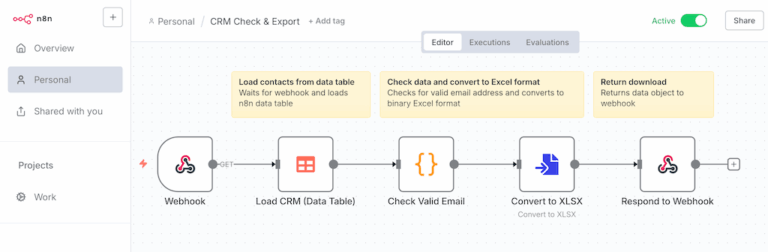
With n8n, you can automate your business processes as an open source alternative to expensive SaaS solutions – with full data control and drastic cost savings. The visual editor makes n8n equally usable for marketing and developers.
ChatGPT Agents: How companies use AI agents for efficient work processes in 2025
ChatGPT agents are revolutionizing the way we work with AI by going beyond simple chatbots and taking on complex tasks on their own. This overview shows you how you can use these powerful tools effectively for your work processes.
n8n-Workflow-Patterns: Linear, Tool-Agents, MCP-Agents
Anyone who automates in n8n or Zapier must consider how to set up their workflows efficiently and maintainably. The article shows how classic workflows, agents with tool use and MCP-based workflows differ – clearly, compactly and with an evaluation.
Zapier MCP: Easily connect AI tools with 7,000 apps – without API development
Zapier MCP offers AI assistants such as Claude Desktop or code editors direct access to more than 7,000 applications via chat. Simply click.
Effective midjourney prompting techniques for better results
Targeting mid-journey prompts can make the difference between mediocre and impressive results. Use these proven techniques to optimize your queries and get exactly the images you envision.
Create your own n8n templates: Step-by-step guide
TL;DR
Creating n8n templates — the short version For inspiration, check out our curated list of the 10 best n8n workflow templates.
- Start with a working workflow: Build and fully test your automation before turning it into a template. A template built on a broken workflow will fail for everyone who uses it.
- Use variables, not hard-coded values: Replace API keys, email addresses, and environment-specific settings with variables or clearly marked placeholders so others can configure the template without editing JSON manually.
- Document everything: Add sticky notes inside the workflow and write a setup guide covering required credentials, configuration steps, and known edge cases. This is what makes the difference between a template and a puzzle.
- Test from a clean import: Import your exported JSON into a fresh workflow and follow only your own docs to verify that a new user can get it running without help.
- Publish and get feedback: Share via n8n.io/workflows or GitHub. Community feedback reveals blind spots and helps you build a reputation as an automation expert.
Teams that template their most-used workflows cut development time by 30–60% and onboard new members faster — the investment pays off by the third similar workflow you build.
In this guide, you will learn how to create your own n8n templates to standardize workflows for you and your team and save time. These templates are particularly valuable if you regularly set up similar automations. If you’re new to n8n, start with our guide on how n8n workflow automation works.
The 7 most effective prompting techniques for AI applications in 2025
TL;DR – Prompting Techniques
The highest-impact prompting techniques are few-shot examples, role-based constraints, structured output formats, and step-by-step task decomposition. Most teams do not need longer prompts; they need clearer success criteria, better examples, and a reliable way to verify the answer.
Communicating effectively with AI systems requires more than just asking questions. The following prompting techniques will help you achieve more precise results and realize the full potential of AI applications in your everyday work.